Mini Mortgage Manager3
Publisher Description
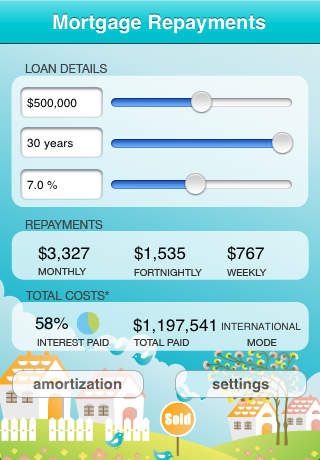
Use Mini Mortgage Manager Enterprise to quickly estimate how much your monthly, fortnightly or weekly mortgage repayments will be based on the amount you want to borrow.
Supports:
* Canadian mortgages which are calculated semi-annually, just click on the "settings" button to turn this mode on.
* Sliders to quickly change the amount/years/% to instantly see how this affects your total cost and interest proportion of you loan.
* Tap the amount/years/% area to manually type in your values.
* Now with an amortization table that you can email then copy / paste in to your favorite spreadsheet program.
* Simple design and tested worldwide.
* Shows your repayment amounts by month / fortnight or week instantly without any calculate buttons.
Will show currency units based on your iPhone region.
Loan details symbols eg $, , EURO, will be shown depending on what you have chosen for you iphones region format (home >settings > General > International > Region Format).
Requires iOS 3.0 or later. Compatible with iPhone, iPad, and iPod touch.
About Mini Mortgage Manager
The company that develops Mini Mortgage Manager is John Ballinger. The latest version released by its developer is 3.
To install Mini Mortgage Manager on your iOS device, just click the green Continue To App button above to start the installation process. The app is listed on our website since 2008-07-11 and was downloaded 3 times. We have already checked if the download link is safe, however for your own protection we recommend that you scan the downloaded app with your antivirus. Your antivirus may detect the Mini Mortgage Manager as malware if the download link is broken.
How to install Mini Mortgage Manager on your iOS device:
- Click on the Continue To App button on our website. This will redirect you to the App Store.
- Once the Mini Mortgage Manager is shown in the iTunes listing of your iOS device, you can start its download and installation. Tap on the GET button to the right of the app to start downloading it.
- If you are not logged-in the iOS appstore app, you'll be prompted for your your Apple ID and/or password.
- After Mini Mortgage Manager is downloaded, you'll see an INSTALL button to the right. Tap on it to start the actual installation of the iOS app.
- Once installation is finished you can tap on the OPEN button to start it. Its icon will also be added to your device home screen.
